Showing posts with label Charts and Graphs. Show all posts

Wednesday, July 4, 2012

Using Graphs and Tables on Presentation Slides
By Dave Paradi, MBA,
co-author of "Guide to PowerPoint"

When presenting ideas that include references to data, it can be helpful to make the point using a graph or table. These visual methods can make the point much stronger than simply describing the data. While they can be powerful methods, they also have the potential to ruin a presentation if they convey the wrong message or they confuse the audience. Appropriate use of graphs and tables is one way to enhance the message you are delivering.

Click here to continue.

[from thinkoutsidetheslide.com]

Monday, July 2, 2012

Using Charts

U SING
C HARTS
The most common mistake presenters make with visuals is overloading them, says Judith Stein, co-author of Presentations for Decision Makers (Van Nostrand Reinhold, 1996).
When using visuals, "You want the audience to look at the screen, quickly get the message, and then focus on you," she says. When viewers have to spend time reading, "you become the voice-over to a video, and lose your effectiveness as a presenter."
In visual support, Stein continues, "The operative word is 'support.' Visuals are supposed to support or aid you in giving the presentation - not replace you."

Click here to learn about charts.

Monday, May 28, 2012

The Line Graph

The line graph is the most popular graph and has many purposes. 

The commonly used line graph consists of a x-axis and and y-axis.  The x-axis (which is the horizontal line) usually measures a unit of time, while the y-axis (which is the verticle line) usually measures a unit of quantity.  You should however note, the x-axis and y-axis can be applied to measure various units.

See below for the x-axis (left to right) and y-axis (top to bottom):

Also note that the y-axis can be on either side, as well as, the x-axis be on top or bottom.

Here is an example of a line graph with a single item:

This line graph shows the increase in sales due to the 2009 marketing campaign.  In the graph, the blue line represents the change in sales from quarter to quarter.  The x-axis represents each quarter, while the y-axis represents percentage from 0 to 100.

Here is an example of a line graph with multiple lines:


This line graph shows the products sales for three different products in the first quarter of 2012.  The x-axis represents the first quarter (by month), while the y-axis represents the number sold, in millions (as an example 2 = 2,000,000).

Here is an example of a line graph with markers:

In this graph you can see "markers" in the shapes of squares, diamonds and triangles.  These markers are used to show your audience distinct points in your graph.  In this graph the markers are used to show the mid-point of each category.  Corresponding on the right of the graph, the markers are explained so the audience understands which marker represents which item.


Thursday, May 24, 2012

The Pie Chart

Pie Chart
A pie chart is a round graph that represents a specific item.  Each section of the pie is divided to show a certain quantity.

Examples

Using a pie chart to divide a year by quarters


This pie chart represents 2010 sales, in millions of dollars.  Each section of the pie represents a quarter.  So, in the first quarter there was $15 million in sales, in the second quarter there was $5 million in sales and so on.


Using a Pie Chart to show a division of 100%


This pie chart represents the favorite color for 100 participants.  There are five different pies, each representing a category.  In this type of pie chart, each section of the pie should equal 100%.


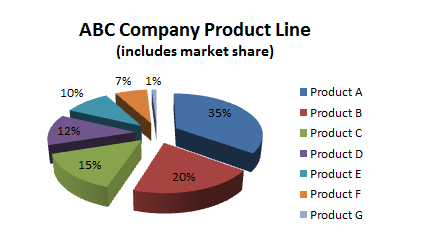
Using a pie chart to show characteristics of a unified (related) group

This pie chart represents the entire product line for company ABC.  Additionally, this pie chart seperates each product by their market share. 

There are many different styles available in both the usage and design of the pie chart.  Make sure you use the pie chart in a manner that shows your audience the data in an easy to understand format.